

Der kostenlose Scanner prüft, ob Ihr Computer infiziert ist.
JETZT ENTFERNENUm das Produkt mit vollem Funktionsumfang nutzen zu können, müssen Sie eine Lizenz für Combo Cleaner erwerben. Auf 7 Tage beschränkte kostenlose Testversion verfügbar. Eigentümer und Betreiber von Combo Cleaner ist RCS LT, die Muttergesellschaft von PCRisk.
Was für eine Malware ist Mantax Otax?
Mantax Otax ist eine Android-Ransomware mit integrierten Spyware-Funktionen, die auf Nutzer in Indonesien abzielt. Sie verschlüsselt Dateien auf dem Gerät, sperrt den Bildschirm und drängt die Opfer in einen Chat mit den Angreifern, während sie heimlich Nachrichten, Fotos, Passwörter und andere persönliche Daten stiehlt. Die Malware wurde erstmals vom zLabs-Team von Zimperium analysiert.

Mantax Otax Malware im Überblick
Mantax Otax wird mit indonesischen Bedrohungsakteuren in Verbindung gebracht, und bislang wurden zwei Versionen davon entdeckt, wobei die zweite auf der ersten aufbaut. Sprachliche Hinweise und von Opfern wiederhergestellte Dateien zeigen, dass sich die Betreiber auf indonesische Nutzer konzentrieren.
Direkt nach der Installation fordert die Malware Geräteadministratorrechte an. Die Admin-Eingabeaufforderung listet offen Fähigkeiten auf wie das Löschen aller Daten, das Ändern der Bildschirmsperre, das Sperren des Bildschirms und das Deaktivieren von Kameras. Anschließend fordert sie Zugriff auf die Kamera, SMS-Nachrichten, Kontakte, Audio und Bilder sowie die Berechtigung, Inhalte über anderen Apps anzuzeigen.
Der letzte Schritt ist eine Anfrage auf Zugriff auf die Bedienungshilfen (Accessibility Services), die als Pop-up in indonesischer Sprache angezeigt wird und das Opfer auffordert, sowohl den Zugriff auf die Bedienungshilfen als auch auf Benachrichtigungen zu aktivieren. Sobald dies gewährt wurde, verschafft dies den Angreifern weitreichende Kontrolle über das Gerät, einschließlich der Möglichkeit, den Bildschirminhalt auszulesen und im Namen des Opfers zu tippen.
Mantax Otax kommuniziert über HTTPS mit seinem Command-and-Control-Server (C2). Anstatt die Serveradresse in seinem Code zu speichern, ruft es die aktuelle Domain (apimantax[.]otax[.]fun) aus einem GitHub-Repository ab. Dadurch können die Betreiber jederzeit auf einen neuen Server wechseln, sobald der alte blockiert wird, ohne die Malware selbst aktualisieren zu müssen.
Die Malware weist dem Gerät dann eine eindeutige ID zu und registriert es beim Server. Die Registrierungsdaten umfassen das Telefonmodell und den Hersteller, die Android-Version, das Land, den Mobilfunkanbieter und sogar, ob eine PIN für die Bildschirmsperre eingerichtet wurde. Danach wartet sie auf Befehle, die über Firebase übermittelt werden.
Für den Ransomware-Teil fordert Mantax Otax einen Verschlüsselungsschlüssel vom C2-Server an. Jeder Schlüssel ist an die Android-ID des Opfers gebunden, sodass jedes infizierte Gerät einen anderen erhält. Die Malware sucht dann nach Fotos, Videos, Dokumenten, Archiven, Datenbanken und kryptografischen Schlüsseldateien, sperrt sie mit AES-Verschlüsselung und löscht die Originale.
Verschlüsselte Dateien behalten ihren ursprünglichen Namen, wobei .enc am Ende angehängt wird (zum Beispiel sample_image.jpg.enc). Einige Bilder werden außerdem durch veränderte Kopien ersetzt, die mit der Nachricht „Your files have been encrypted. Pay to decrypt." versehen sind. Beim Test von Zimperium verwandelten sich die Galerie-Miniaturansichten in leere Dateisymbole, wobei ein Bild durch roten Erpressertext ersetzt wurde.
Wie großer Schaden dabei angerichtet wird, hängt von der Android-Version ab. Auf Android 9 oder älter durchwühlt die Malware den gesamten gemeinsam genutzten Speicher und überspringt nur die Systemordner, die sie unangetastet lassen muss, um kein Abstürzen des Telefons zu verursachen. Android 10 und neuer verwenden einen Schutzmechanismus namens Scoped Storage, der die Malware auf ihren eigenen App-Ordner beschränkt und die Anzahl der Dateien, auf die sie zugreifen kann, stark begrenzt.
Sobald die Verschlüsselung abgeschlossen ist, übernimmt ein Vollbild-Chatfenster mit dem Titel SYSTEM PROTECTED die Anzeige, und der Angreifer erscheint darin als Mantax Bro!!. Hier wird den Opfern mitgeteilt, dass sie über eine Zahlung verhandeln sollen. Da die Betreiber ihren Firebase-Server falsch konfiguriert hatten, konnte Zimperium diese Gespräche mitlesen, einschließlich Nachrichten von Opfern, die darum flehten, ihre Dateien zurückzuerhalten.
In Kombination mit dem unten beschriebenen Datendiebstahl versetzt dies die Opfer in eine Situation der doppelten Erpressung, in der sich sowohl ihre Dateien als auch ihre persönlichen Informationen in den Händen der Angreifer befinden.
Mantax Otax kann das Telefon auch hinter einer gefälschten Systemsperrbildschirm-Anzeige sperren. Eine Version zeigt SYSTEM PROTECTED an, behauptet, das Gerät befinde sich unter einer administrativen Sperre, und trägt das Branding Manta X2 Elite Security, während eine andere in indonesischer Sprache verfasst ist. Beide fordern eine PIN an, sodass die Opfer letztlich ihren echten Sperrbildschirm-Code direkt an die Angreifer aushändigen.
Die Spyware-Seite ist ebenso weitreichend. Durch den Missbrauch der in Android integrierten Bildschirmaufnahme-Funktion (der MediaProjection-API) kann die Malware Screenshots erstellen, den Bildschirm als MP4-Videos aufzeichnen und die Anzeige live an die Angreifer streamen. Screenshots und Aufnahmen werden auf den kostenlosen Filehoster Catbox hochgeladen, und die Download-Links werden an die Betreiber gesendet.
Darüber hinaus sammelt Mantax Otax Kontakte, Anrufprotokolle, eingehende SMS-Nachrichten (einschließlich Einmalpasswörter, die für Anmeldungen verwendet werden), Benachrichtigungen, Browserverlauf, installierte Apps, Standort, verknüpfte Google-Konten, Dateien und Galeriefotos. Über die Bedienungshilfen stiehlt sie zudem WhatsApp-Profile und -Nachrichten sowie Telegram-Kontodaten und -Chats, indem sie eigenständig Konversationen öffnet und deren Inhalte kopiert.
Die Malware kann heimlich Fotos mit der Front- oder Rückkamera aufnehmen, ohne dass dies auf dem Bildschirm sichtbar ist. Die Fotos werden komprimiert, in Base64 kodiert und an die Betreiber gesendet - durchgesickerte Serveraufzeichnungen zeigen, dass sie ebenfalls auf Catbox gespeichert werden.
Zu den durch den falsch konfigurierten Server offengelegten Dateien gehörte auch ein Screenshot des Kontrollpanels der Betreiber mit dem Branding Manta Controller. Zu diesem Zeitpunkt waren dort 210 infizierte Geräte aufgeführt (nur zwei davon online), darunter Telefone von vivo, Infinix und Xiaomi.
Die zweite Version wechselt über eine andere Subdomain (apixnxx[.]otax[.]fun) zu WebSocket-Verbindungen und fügt neue Befehle hinzu, die darauf abzielen, Opfer zu kontrollieren und zu quälen. Sie kann den Bildschirm mit einer Nachricht in indonesischer Sprache sperren, die behauptet, das Gerät werde von Manta X2 kontrolliert, jede Aktivität werde überwacht, und das Opfer müsse einen Admin kontaktieren, um wieder Zugriff zu erhalten.
Version 2 kann außerdem einzelne Apps blockieren und eine unsichtbare Schicht über den gesamten Bildschirm legen, die jeden Tipp und jede Wischbewegung verschluckt, wodurch das Telefon sichtbar, aber unbrauchbar bleibt. Andere Befehle überfluten die Anzeige mit Pop-up-Dialogen, spielen ein Vollbildvideo ab, um zu verbergen, was im Hintergrund geschieht, oder blitzen alle 600 Millisekunden erschreckende Bilder auf, um einen desorientierenden Stroboskopeffekt zu erzeugen.
Die Betreiber können das Telefon sogar zum Sprechen bringen. Ein Remote-Text-to-Speech-Befehl liest jede beliebige Nachricht der Angreifer über den Gerätelautsprecher vor, mit anpassbarer Sprache, Geschwindigkeit und Tonhöhe.
Zusammenfassend lässt sich sagen, dass das Vorhandensein von Software wie Mantax Otax auf Geräten zu mehrfachen Systeminfektionen, ernsthaften Datenschutzproblemen, finanziellen Verlusten und Identitätsdiebstahl führen kann. Opfer riskieren, ihre Fotos und Dokumente, ihre Konten und ihre privaten Konversationen gleichzeitig zu verlieren.
Es muss erwähnt werden, dass Malware-Entwickler ihre Software und Methoden häufig verbessern. Daher könnten künftige Iterationen von Mantax Otax zusätzliche oder andere Funktionen und Merkmale aufweisen.
| Name | Mantax Otax Trojaner |
| Bedrohungstyp | Android-Malware, bösartige Anwendung, Ransomware, Spyware, unerwünschte Anwendung. |
| Erkennungsnamen | Avast-Mobile (Android:Evo-gen [Trj]), Combo Cleaner (Android.Riskware.SpyAgent.OV), ESET-NOD32 (Android/Spy.Agent.GGC Trojan), Kaspersky (HEUR:Backdoor.AndroidOS.Agent.iz), Vollständige Liste (VirusTotal) |
| Symptome | Dateien werden verschlüsselt und mit der Erweiterung .enc umbenannt, der Bildschirm wird durch eine gefälschte Systemsperre oder ein Chatfenster gesperrt, das Gerät läuft langsam, Daten- und Batterienutzung sind deutlich erhöht, fragwürdige Anwendungen erscheinen, Pop-ups und Overlays blockieren die normale Nutzung. |
| Verbreitungsmethoden | APK-Dateien auf Drittanbieter-Filesharing-Diensten, über Messaging-Apps geteilte Links, Phishing-Nachrichten, Social Engineering, als legitime oder Erwachseneninhalte-Anwendungen getarnte Apps. |
| Schaden | Verschlüsselte Dateien, gesperrtes Gerät, gestohlene persönliche Informationen (private Nachrichten, Logins/Passwörter, Einmalpasswörter, Fotos usw.), verminderte Geräteleistung, schnell entleerte Batterie, verringerte Internetgeschwindigkeit, enorme Datenverluste, finanzielle Verluste, gestohlene Identität (bösartige Apps könnten Kommunikations-Apps missbrauchen). |
| Malware-Entfernung (Windows) |
Um mögliche Malware-Infektionen zu entfernen, scannen Sie Ihren Computer mit einer legitimen Antivirus-Software. Unsere Sicherheitsforscher empfehlen die Verwendung von Combo Cleaner. Combo Cleaner herunterladenDer kostenlose Scanner überprüft, ob Ihr Computer infiziert ist. Um das Produkt mit vollem Funktionsumfang nutzen zu können, müssen Sie eine Lizenz für Combo Cleaner erwerben. Auf 7 Tage beschränkte kostenlose Testversion verfügbar. Eigentümer und Betreiber von Combo Cleaner ist RCS LT, die Muttergesellschaft von PCRisk. |
Fazit
Mantax Otax ist eine üble Kombination aus Ransomware und Spyware. Sie kann ein Opfer von seinem Telefon und seinen Dateien aussperren, es über ein Chatfenster zur Zahlung drängen und gleichzeitig fast alles sammeln, was auf dem Gerät gespeichert oder darauf angezeigt wird. Selbst wenn Dateien wiederhergestellt werden, bleiben die gestohlenen Nachrichten, Codes und Fotos ein langfristiges Risiko.
Weitere Beispiele für Android-spezifische Malware sind Manic, WindRelay und Rokarolla. Bösartige Apps wie diese fordern in der Regel umfangreiche Berechtigungen an und missbrauchen sie, um Daten zu stehlen, Nutzer auszuspionieren oder das Gerät vollständig zu übernehmen.
Wie hat Mantax Otax mein Gerät infiltriert?
Zimperium fand Mantax-Otax-Samples, die als APK-Dateien auf einem Drittanbieter-Filesharing-Dienst gehostet wurden, wobei eines davon unter dem Namen VoCNewEra angeboten wurde. Links zu solchen Dateien werden üblicherweise über Messaging-Apps, Phishing-Nachrichten und andere Social-Engineering-Tricks verbreitet. Da die App nicht im Google Play Store verfügbar ist, müssen die Opfer ihre Installation manuell zulassen.
Zu den bisher beobachteten Ködern gehören eine App mit einem indonesischen Namen, der auf Erwachseneninhalte hindeutet, und einige Samples geben sich Berichten zufolge als legitime Apps wie Grok aus. Cyberkriminelle verlassen sich auf solche Tarnungen, weil neugierige oder vertrauensselige Nutzer eher dazu neigen, die lange Liste der Berechtigungsanfragen durchzutippen, ohne zweimal nachzudenken.
Wie kann man die Installation von Malware vermeiden?
Installieren Sie Apps nur aus dem Google Play Store oder von der offiziellen Website des Entwicklers und seien Sie vorsichtig bei APK-Dateien, die über File-Hosting-Links, Chats oder soziale Medien geteilt werden - selbst wenn ein Freund sie sendet. Achten Sie auf die Berechtigungen, die eine App anfordert. Ein Videoplayer, ein Chatbot oder ein Spiel hat keinen Grund, Administratorrechte, Bedienungshilfen oder die Möglichkeit zu benötigen, Ihre SMS-Nachrichten zu lesen.
Halten Sie Android und Ihre Apps aktuell, da neuere Android-Versionen einschränken, worauf Malware wie diese zugreifen kann. Ignorieren Sie unerwartete Nachrichten, die Sie zum Herunterladen von etwas drängen, und vermeiden Sie Apps mit Erwachseneninhalten, geknackte Apps oder „Premium kostenlos"-Apps aus inoffiziellen Quellen. Es hilft auch, ein seriöses mobiles Antivirenprogramm installiert zu haben und wichtige Fotos und Dokumente regelmäßig zu sichern.
Mantax Otax APK, gehostet auf einer Drittanbieter-Filesharing-Website (Quelle: zimperium.com):

Von Mantax Otax während der Installation angezeigte Berechtigungsanfragen (Quelle: zimperium.com):

Dateien auf einem infizierten Gerät vor und nach der Verschlüsselung durch Mantax Otax (Quelle: zimperium.com):

Gefälschte Sperrbildschirme, die von Mantax Otax verwendet werden, um die PIN des Opfers zu stehlen (Quelle: zimperium.com):

Bildschirmsperrende Nachricht, die von der zweiten Version von Mantax Otax angezeigt wird (Quelle: zimperium.com):

Schnellmenü:
- Einführung
- Wie löscht man den Browserverlauf aus dem Chrome-Webbrowser?
- Wie deaktiviert man Browser-Benachrichtigungen im Chrome-Webbrowser?
- Wie setzt man den Chrome-Webbrowser zurück?
- Wie löscht man den Browserverlauf aus dem Firefox-Webbrowser?
- Wie deaktiviert man Browser-Benachrichtigungen im Firefox-Webbrowser?
- Wie setzt man den Firefox-Webbrowser zurück?
- Wie deinstalliert man potenziell unerwünschte und/oder bösartige Anwendungen?
- Wie startet man das Android-Gerät im „Abgesicherten Modus"?
- Wie überprüft man den Batterieverbrauch verschiedener Anwendungen?
- Wie überprüft man den Datenverbrauch verschiedener Anwendungen?
- Wie installiert man die neuesten Software-Updates?
- Wie setzt man das System auf seinen Standardzustand zurück?
- Wie deaktiviert man Anwendungen mit Administratorrechten?
Browserverlauf aus dem Chrome-Webbrowser löschen:
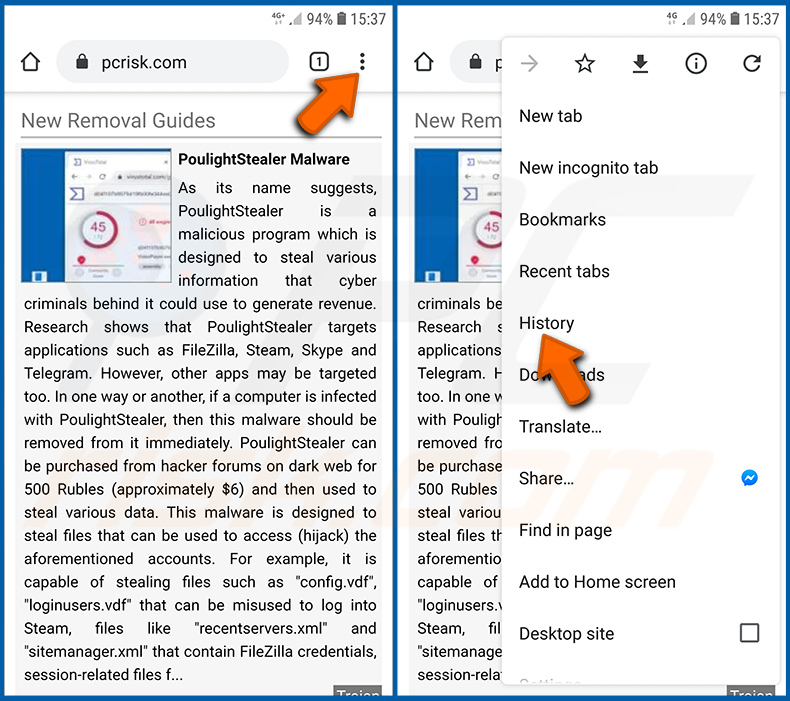
Tippen Sie auf die Schaltfläche „Menü" (drei Punkte in der rechten oberen Ecke des Bildschirms) und wählen Sie „Verlauf" im geöffneten Dropdown-Menü.
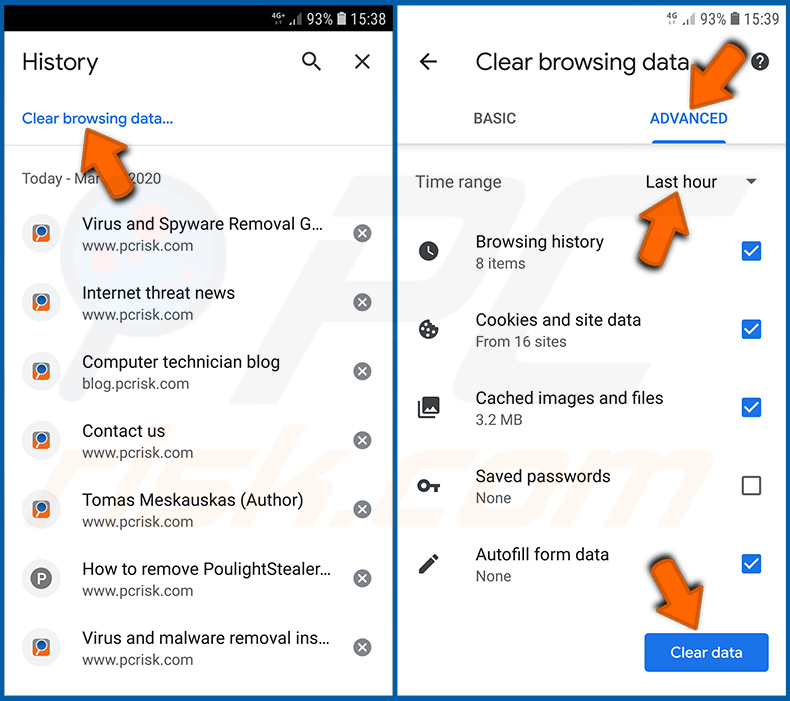
Tippen Sie auf „Browserdaten löschen", wählen Sie die Registerkarte „ERWEITERT", wählen Sie den Zeitraum und die Datentypen aus, die Sie löschen möchten, und tippen Sie auf „Daten löschen".
[Zurück zum Inhaltsverzeichnis]
Browser-Benachrichtigungen im Chrome-Webbrowser deaktivieren:
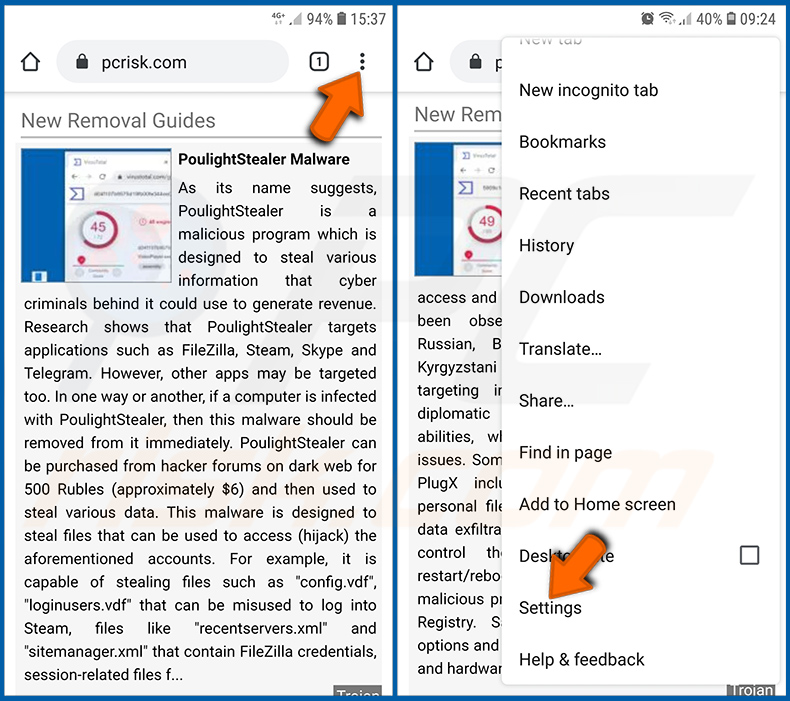
Tippen Sie auf die Schaltfläche „Menü" (drei Punkte in der rechten oberen Ecke des Bildschirms) und wählen Sie „Einstellungen" im geöffneten Dropdown-Menü.
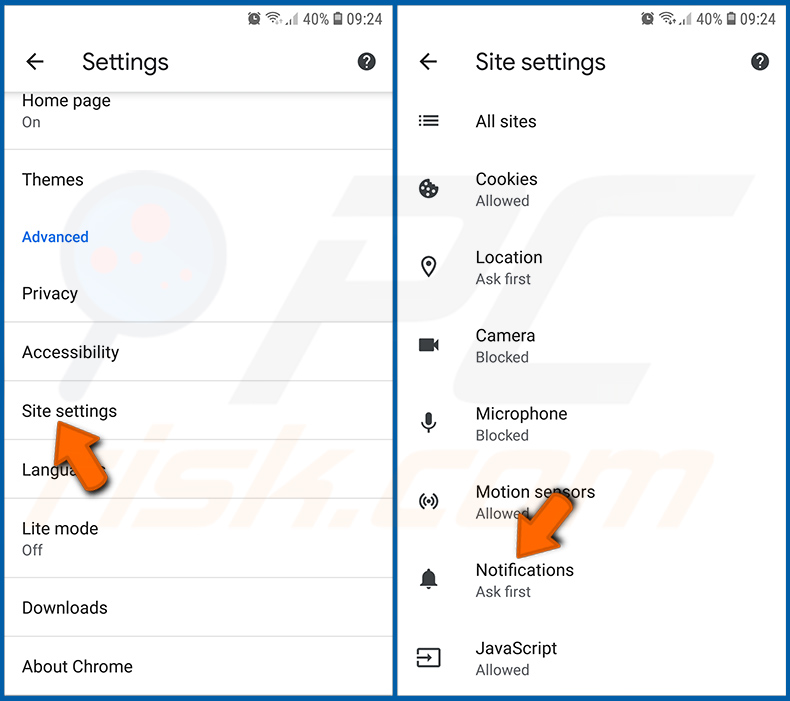
Scrollen Sie nach unten, bis Sie die Option „Website-Einstellungen" sehen, und tippen Sie darauf. Scrollen Sie nach unten, bis Sie die Option „Benachrichtigungen" sehen, und tippen Sie darauf.
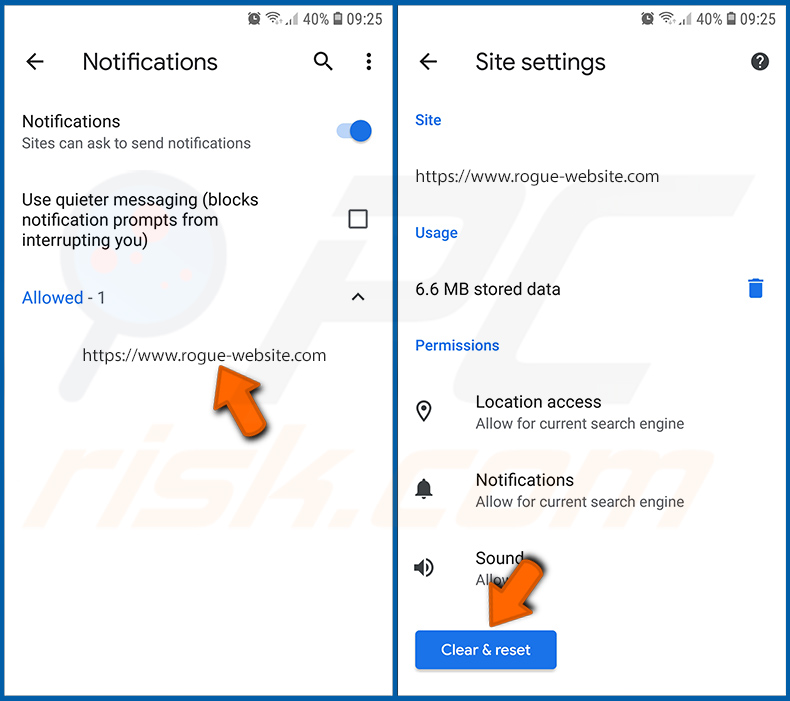
Suchen Sie die Websites, die Browser-Benachrichtigungen senden, tippen Sie darauf und klicken Sie auf „Löschen & zurücksetzen". Dadurch werden die Berechtigungen entfernt, die diesen Websites zum Senden von Benachrichtigungen erteilt wurden. Sobald Sie dieselbe Website jedoch erneut besuchen, kann sie erneut eine Berechtigung anfordern. Sie können wählen, ob Sie diese Berechtigungen erteilen möchten oder nicht (wenn Sie ablehnen, wird die Website in den Bereich „Blockiert" verschoben und fordert Sie nicht mehr um die Berechtigung).
[Zurück zum Inhaltsverzeichnis]
Chrome-Webbrowser zurücksetzen:
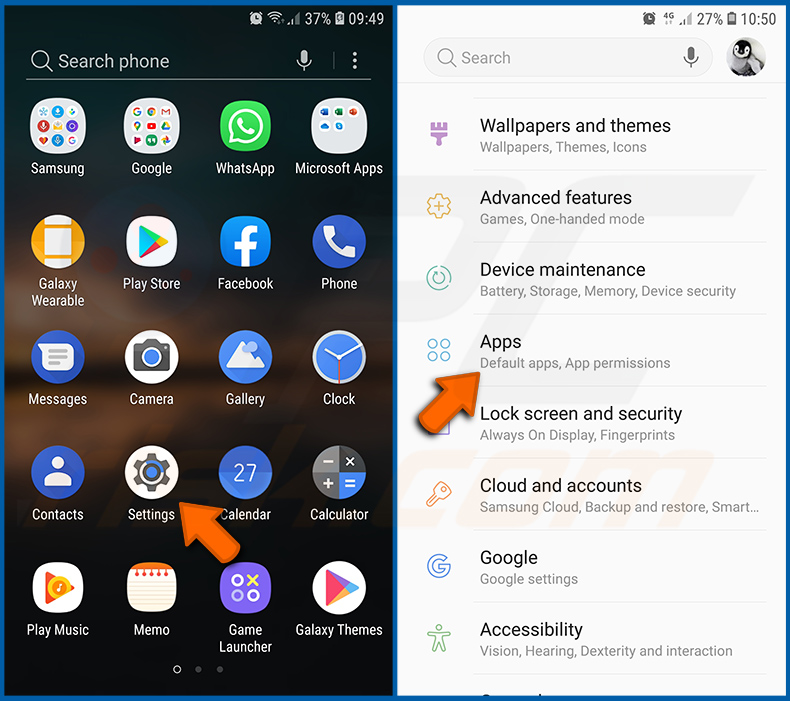
Gehen Sie zu „Einstellungen", scrollen Sie nach unten, bis Sie „Apps" sehen, und tippen Sie darauf.
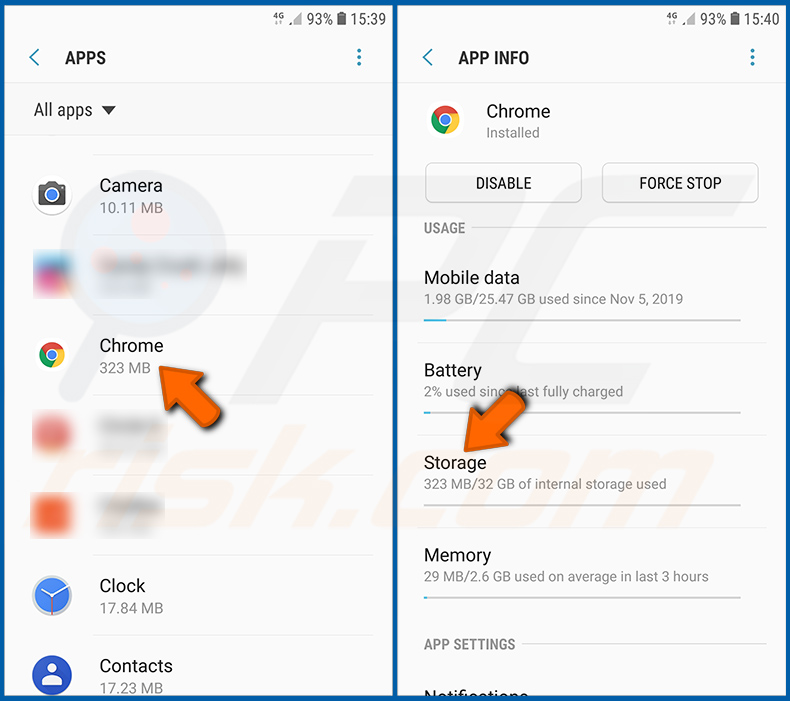
Scrollen Sie nach unten, bis Sie die Anwendung „Chrome" finden, wählen Sie sie aus und tippen Sie auf die Option „Speicher".
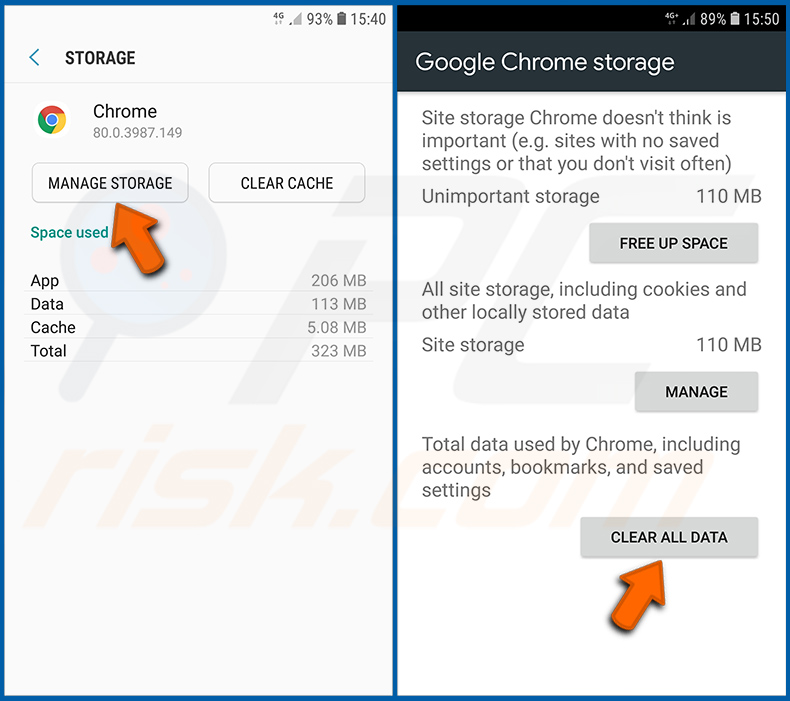
Tippen Sie auf „SPEICHER VERWALTEN", dann auf „ALLE DATEN LÖSCHEN" und bestätigen Sie die Aktion durch Tippen auf „OK". Beachten Sie, dass durch das Zurücksetzen des Browsers alle darin gespeicherten Daten gelöscht werden. Das bedeutet, dass alle gespeicherten Logins/Passwörter, der Browserverlauf, nicht standardmäßige Einstellungen und andere Daten gelöscht werden. Außerdem müssen Sie sich bei allen Websites erneut anmelden.
[Zurück zum Inhaltsverzeichnis]
Browserverlauf aus dem Firefox-Webbrowser löschen:
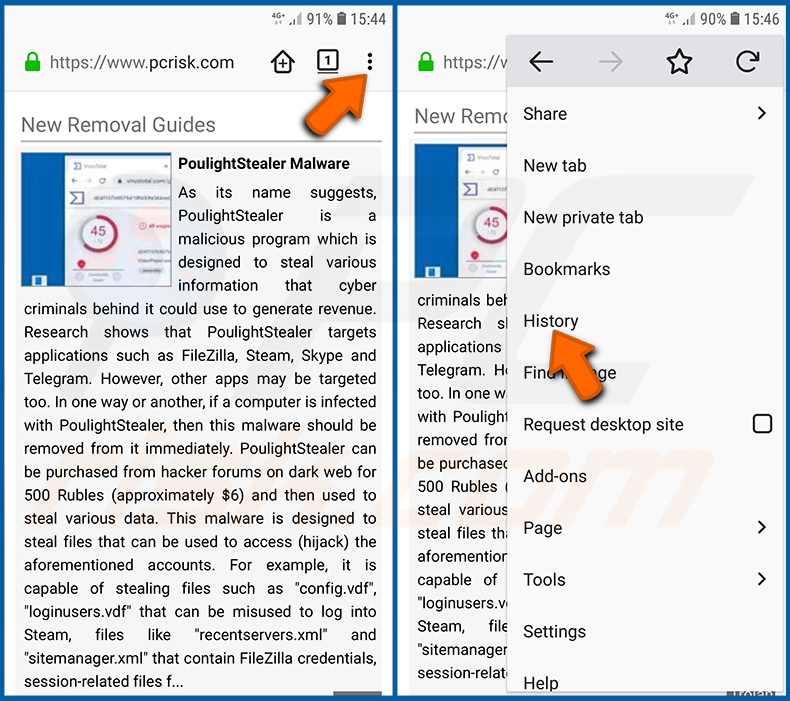
Tippen Sie auf die Schaltfläche „Menü" (drei Punkte in der rechten oberen Ecke des Bildschirms) und wählen Sie „Verlauf" im geöffneten Dropdown-Menü.
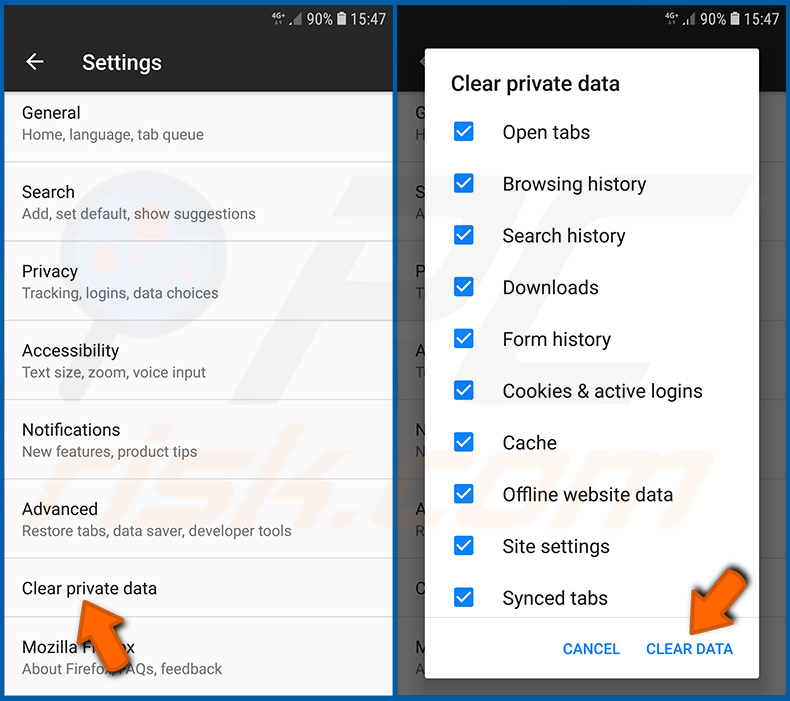
Scrollen Sie nach unten, bis Sie „Private Daten löschen" sehen, und tippen Sie darauf. Wählen Sie die Datentypen aus, die Sie entfernen möchten, und tippen Sie auf „DATEN LÖSCHEN".
[Zurück zum Inhaltsverzeichnis]
Browser-Benachrichtigungen im Firefox-Webbrowser deaktivieren:
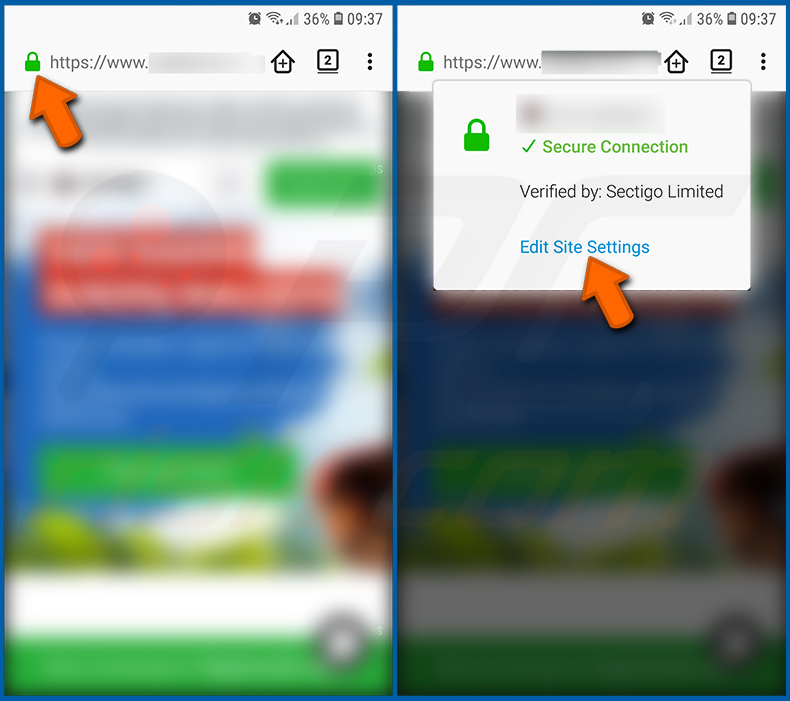
Besuchen Sie die Website, die Browser-Benachrichtigungen sendet, tippen Sie auf das Symbol links neben der URL-Leiste (das Symbol ist nicht unbedingt ein „Schloss") und wählen Sie „Website-Einstellungen bearbeiten".
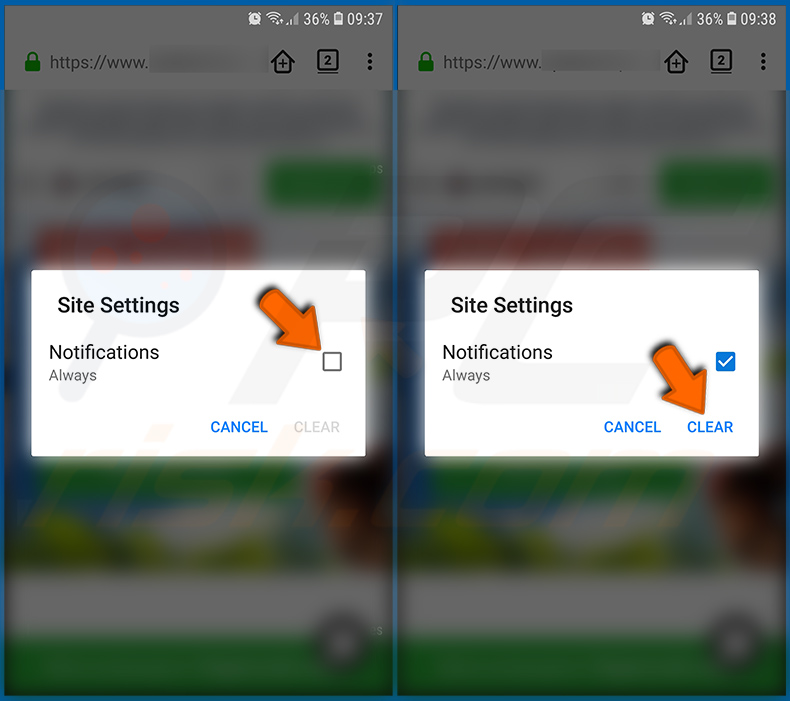
Aktivieren Sie im geöffneten Pop-up die Option „Benachrichtigungen" und tippen Sie auf „LÖSCHEN".
[Zurück zum Inhaltsverzeichnis]
Firefox-Webbrowser zurücksetzen:
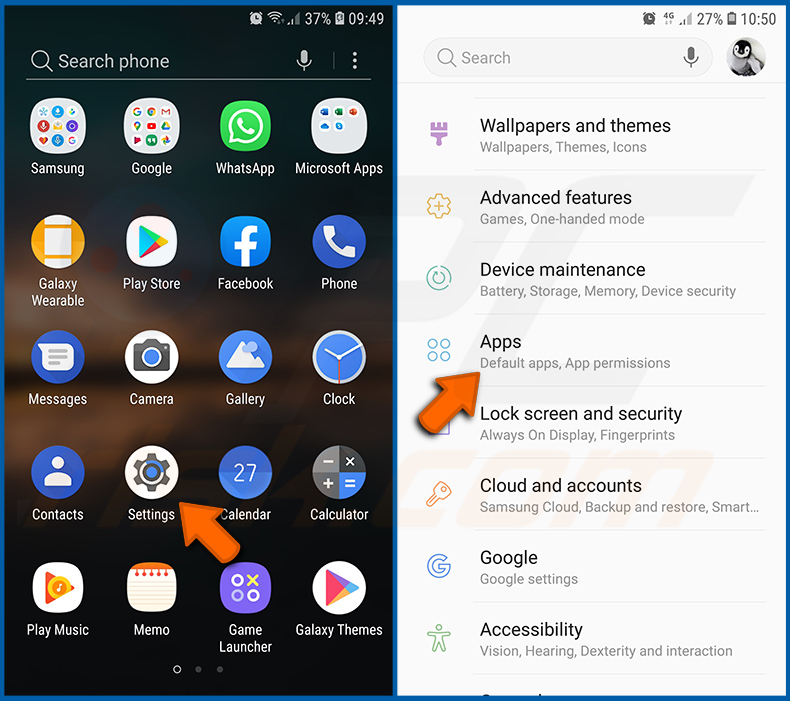
Gehen Sie zu „Einstellungen", scrollen Sie nach unten, bis Sie „Apps" sehen, und tippen Sie darauf.
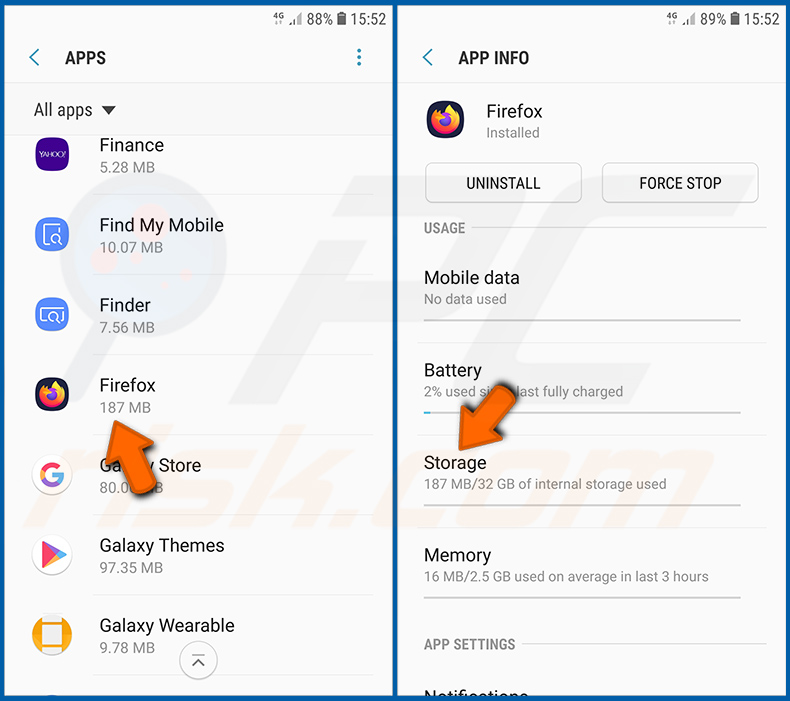
Scrollen Sie nach unten, bis Sie die Anwendung „Firefox" finden, wählen Sie sie aus und tippen Sie auf die Option „Speicher".
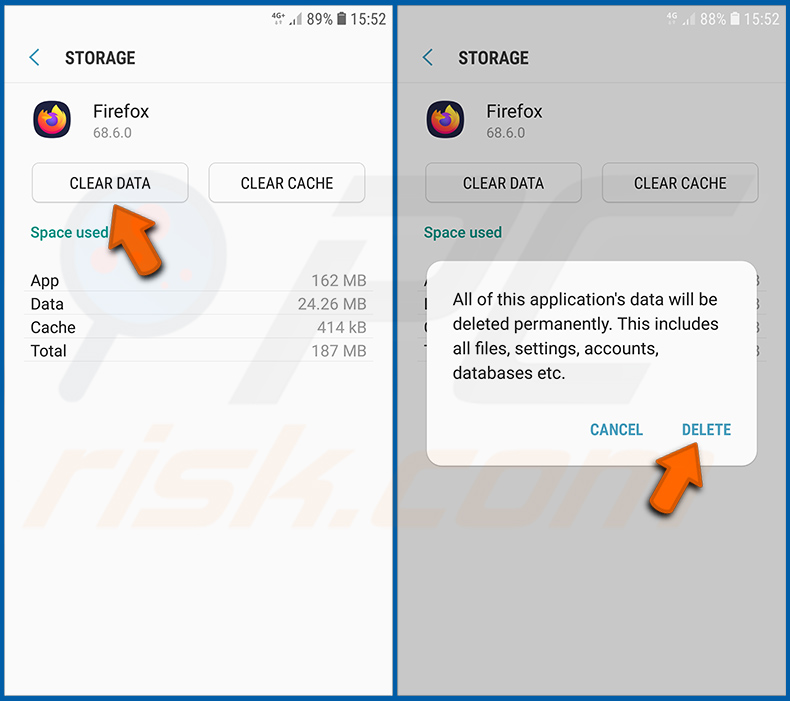
Tippen Sie auf „DATEN LÖSCHEN" und bestätigen Sie die Aktion durch Tippen auf „LÖSCHEN". Beachten Sie, dass durch das Zurücksetzen des Browsers alle darin gespeicherten Daten gelöscht werden. Das bedeutet, dass alle gespeicherten Logins/Passwörter, der Browserverlauf, nicht standardmäßige Einstellungen und andere Daten gelöscht werden. Außerdem müssen Sie sich bei allen Websites erneut anmelden.
[Zurück zum Inhaltsverzeichnis]
Potenziell unerwünschte und/oder bösartige Anwendungen deinstallieren:
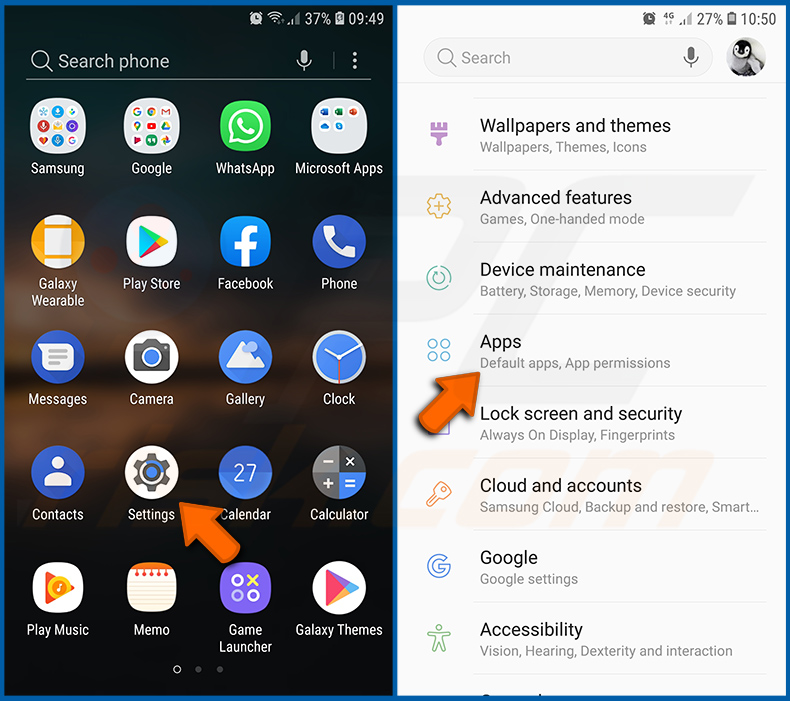
Gehen Sie zu „Einstellungen", scrollen Sie nach unten, bis Sie „Apps" sehen, und tippen Sie darauf.
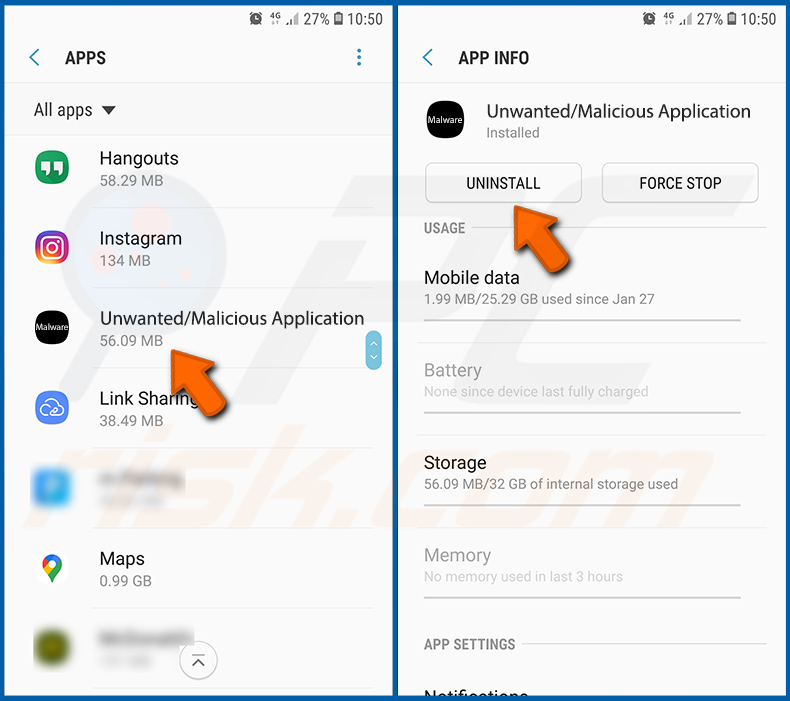
Scrollen Sie nach unten, bis Sie eine potenziell unerwünschte und/oder bösartige Anwendung sehen, wählen Sie sie aus und tippen Sie auf „Deinstallieren". Wenn Sie die ausgewählte App aus irgendeinem Grund nicht entfernen können (z. B. wenn eine Fehlermeldung angezeigt wird), sollten Sie den „Abgesicherten Modus" verwenden.
[Zurück zum Inhaltsverzeichnis]
Android-Gerät im „Abgesicherten Modus" starten:
Der „Abgesicherte Modus" im Android-Betriebssystem deaktiviert vorübergehend die Ausführung aller Drittanbieteranwendungen. Die Verwendung dieses Modus ist eine gute Möglichkeit, verschiedene Probleme zu diagnostizieren und zu lösen (z. B. bösartige Anwendungen zu entfernen, die Sie daran hindern, dies zu tun, wenn das Gerät „normal" läuft).
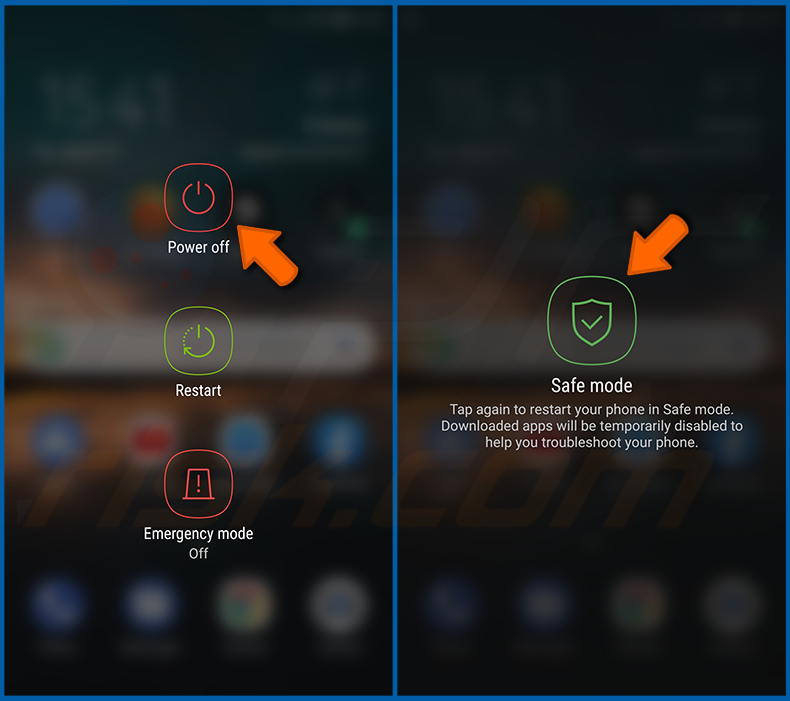
Drücken Sie die Taste „Ein/Aus" und halten Sie sie gedrückt, bis der Bildschirm „Ausschalten" erscheint. Tippen Sie auf das Symbol „Ausschalten" und halten Sie es gedrückt. Nach einigen Sekunden erscheint die Option „Abgesicherter Modus", und Sie können sie durch einen Neustart des Geräts ausführen.
[Zurück zum Inhaltsverzeichnis]
Batterieverbrauch verschiedener Anwendungen überprüfen:
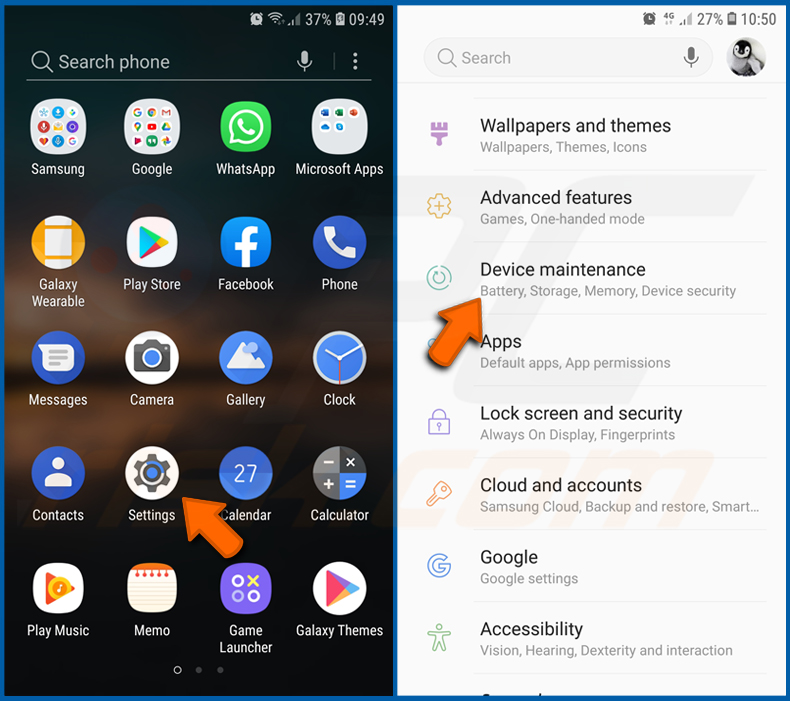
Gehen Sie zu „Einstellungen", scrollen Sie nach unten, bis Sie „Gerätewartung" sehen, und tippen Sie darauf.
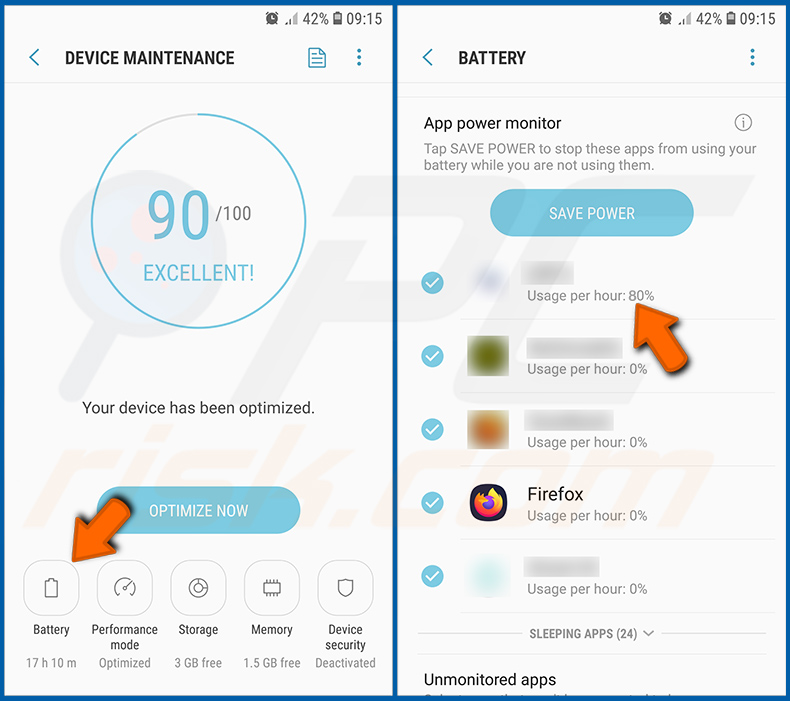
Tippen Sie auf „Batterie" und überprüfen Sie den Verbrauch jeder Anwendung. Legitime/echte Anwendungen sind so konzipiert, dass sie so wenig Energie wie möglich verbrauchen, um das beste Nutzererlebnis zu bieten und Strom zu sparen. Daher kann ein hoher Batterieverbrauch darauf hindeuten, dass die Anwendung bösartig ist.
[Zurück zum Inhaltsverzeichnis]
Datenverbrauch verschiedener Anwendungen überprüfen:
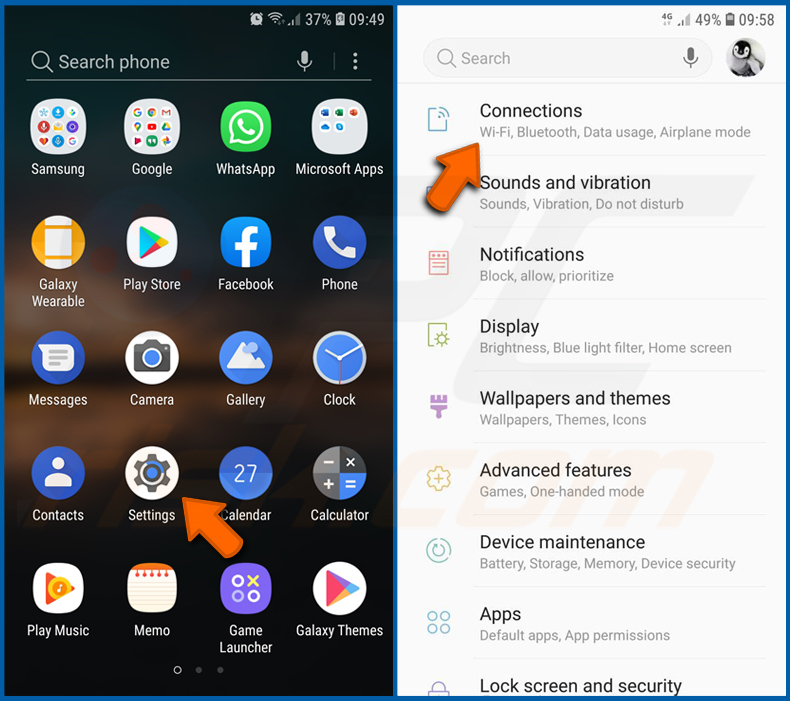
Gehen Sie zu „Einstellungen", scrollen Sie nach unten, bis Sie „Verbindungen" sehen, und tippen Sie darauf.
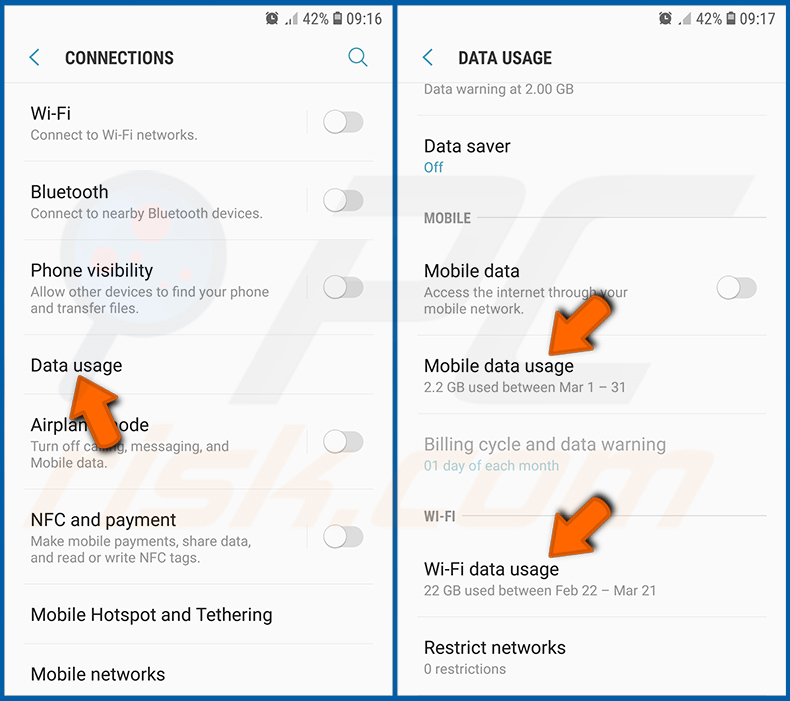
Scrollen Sie nach unten, bis Sie „Datennutzung" sehen, und wählen Sie diese Option. Wie bei der Batterie sind legitime/echte Anwendungen so konzipiert, dass sie den Datenverbrauch so weit wie möglich minimieren. Das bedeutet, dass ein enormer Datenverbrauch auf das Vorhandensein einer bösartigen Anwendung hindeuten kann. Beachten Sie, dass einige bösartige Anwendungen so konzipiert sein könnten, dass sie nur dann funktionieren, wenn das Gerät mit einem WLAN verbunden ist. Aus diesem Grund sollten Sie sowohl den mobilen als auch den WLAN-Datenverbrauch überprüfen.
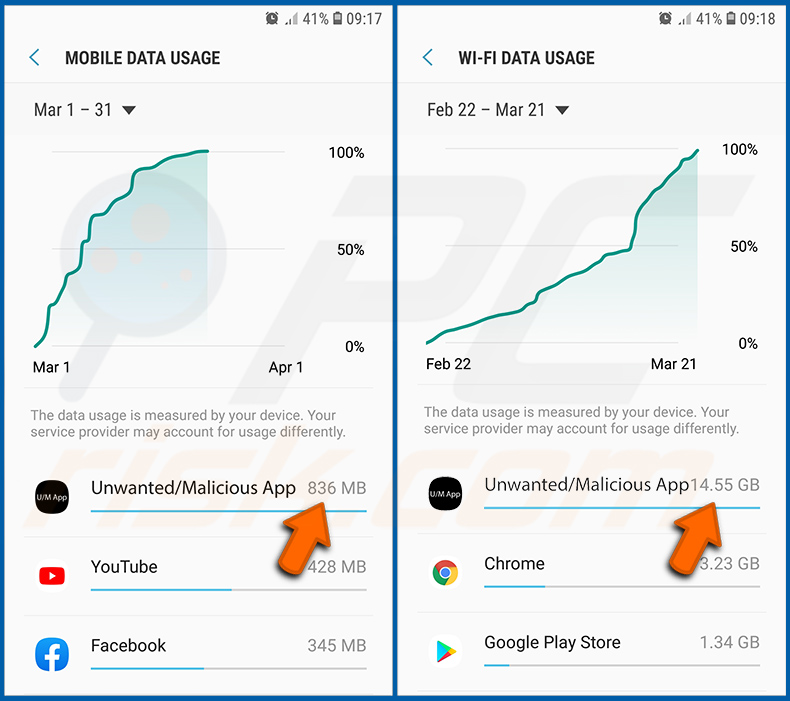
Wenn Sie eine Anwendung finden, die viele Daten verbraucht, obwohl Sie sie nie verwenden, raten wir Ihnen dringend, sie so schnell wie möglich zu deinstallieren.
[Zurück zum Inhaltsverzeichnis]
Die neuesten Software-Updates installieren:
Die Software auf dem neuesten Stand zu halten, ist eine gute Praxis, wenn es um die Sicherheit des Geräts geht. Die Gerätehersteller veröffentlichen kontinuierlich verschiedene Sicherheitspatches und Android-Updates, um Fehler und Bugs zu beheben, die von Cyberkriminellen missbraucht werden können. Ein veraltetes System ist weitaus anfälliger, weshalb Sie stets sicherstellen sollten, dass die Software Ihres Geräts auf dem neuesten Stand ist.
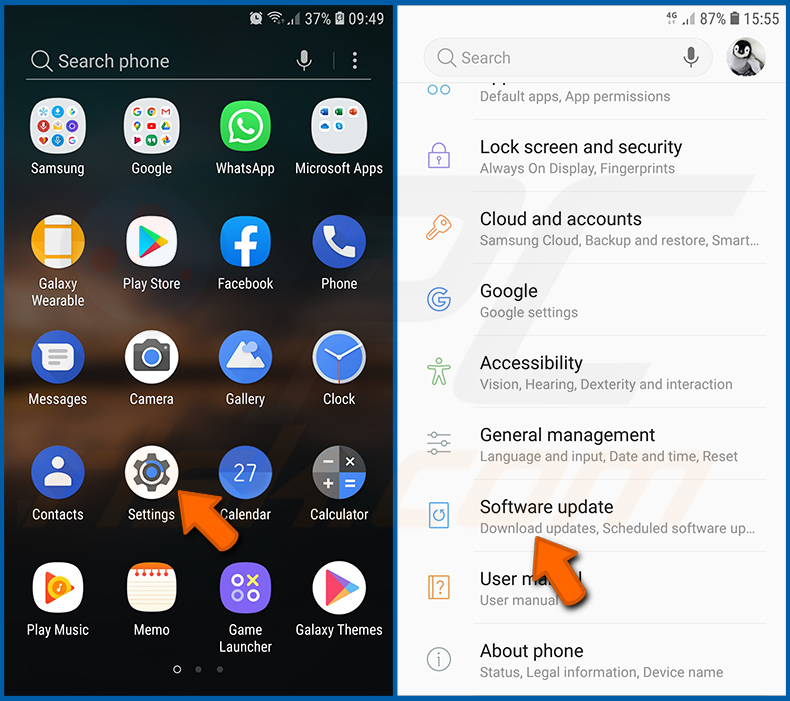
Gehen Sie zu „Einstellungen", scrollen Sie nach unten, bis Sie „Software-Update" sehen, und tippen Sie darauf.
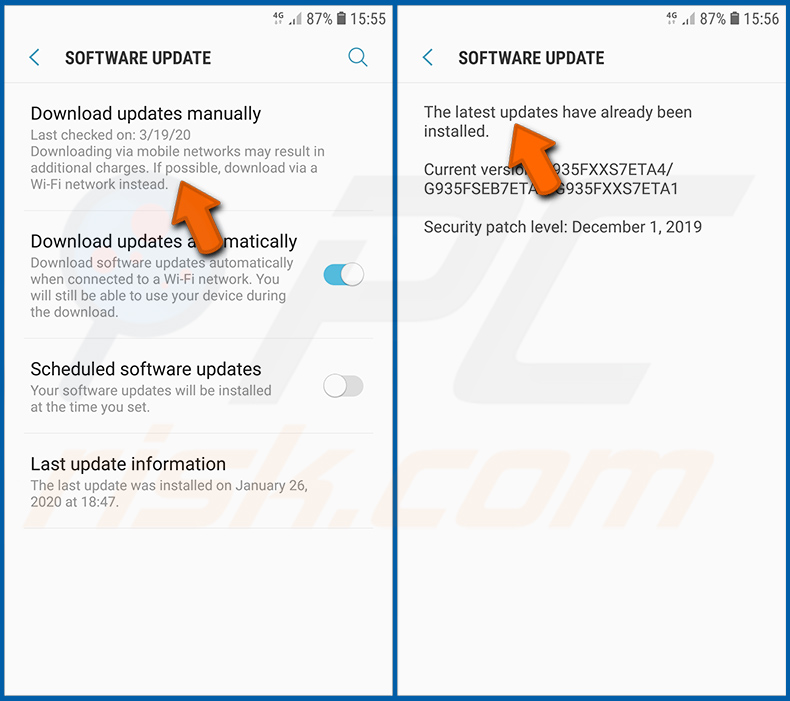
Tippen Sie auf „Updates manuell herunterladen" und prüfen Sie, ob Updates verfügbar sind. Wenn ja, installieren Sie diese sofort. Wir empfehlen außerdem, die Option „Updates automatisch herunterladen" zu aktivieren - dadurch kann das System Sie benachrichtigen, sobald ein Update veröffentlicht wird, und/oder es automatisch installieren.
[Zurück zum Inhaltsverzeichnis]
Das System auf seinen Standardzustand zurücksetzen:
Das Durchführen eines „Zurücksetzens auf Werkseinstellungen" ist eine gute Möglichkeit, alle unerwünschten Anwendungen zu entfernen, die Systemeinstellungen auf die Standardwerte zurückzusetzen und das Gerät allgemein zu bereinigen. Sie müssen jedoch bedenken, dass alle Daten auf dem Gerät gelöscht werden, einschließlich Fotos, Video-/Audiodateien, Telefonnummern (die auf dem Gerät gespeichert sind, nicht auf der SIM-Karte), SMS-Nachrichten und so weiter. Mit anderen Worten, das Gerät wird in seinen ursprünglichen Zustand zurückversetzt.
Sie können auch die grundlegenden Systemeinstellungen und/oder einfach nur die Netzwerkeinstellungen wiederherstellen.
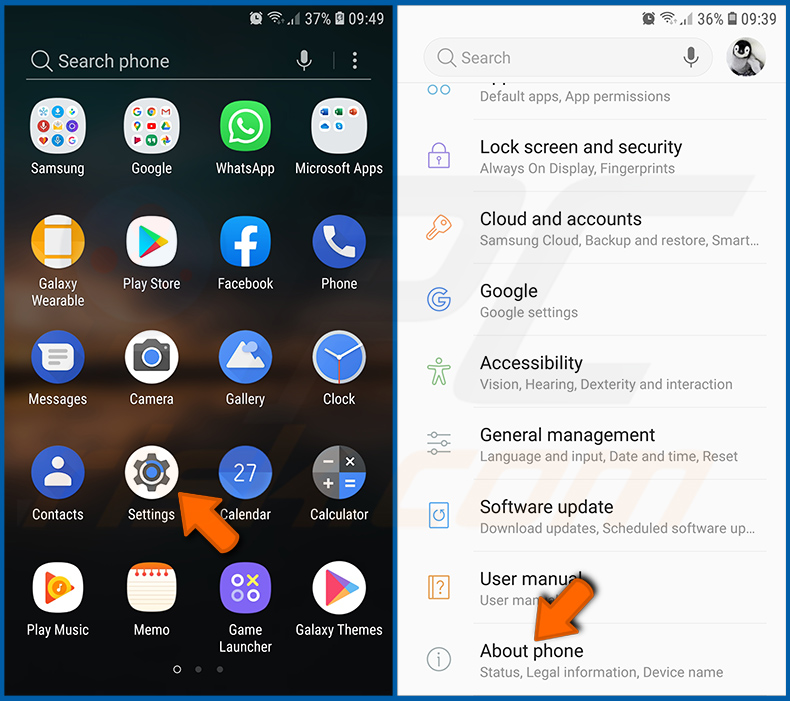
Gehen Sie zu „Einstellungen", scrollen Sie nach unten, bis Sie „Über das Telefon" sehen, und tippen Sie darauf.
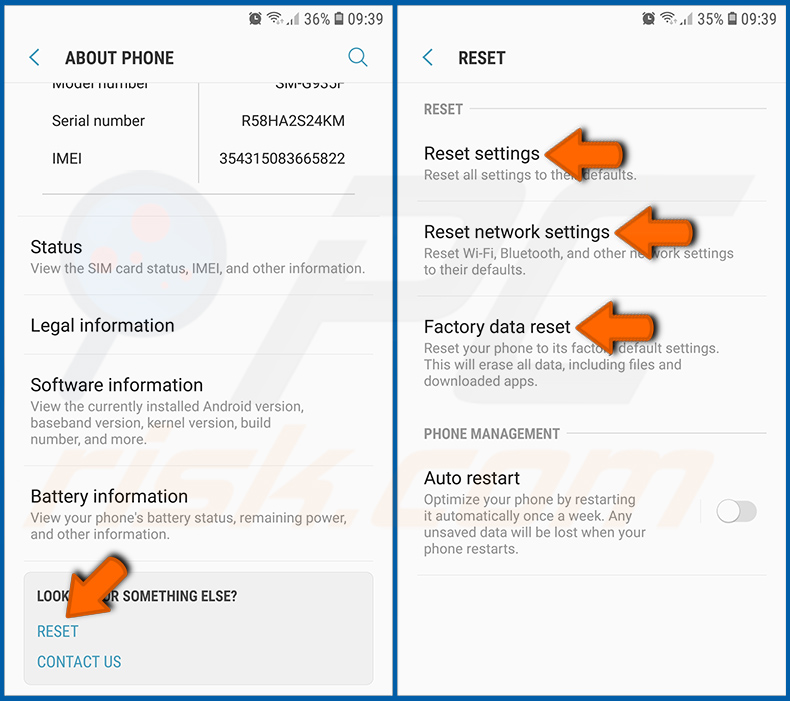
Scrollen Sie nach unten, bis Sie „Zurücksetzen" sehen, und tippen Sie darauf. Wählen Sie nun die Aktion aus, die Sie durchführen möchten:
„Einstellungen zurücksetzen" - alle Systemeinstellungen auf die Standardwerte zurücksetzen;
„Netzwerkeinstellungen zurücksetzen" - alle netzwerkbezogenen Einstellungen auf die Standardwerte zurücksetzen;
„Auf Werkseinstellungen zurücksetzen" - das gesamte System zurücksetzen und alle gespeicherten Daten vollständig löschen;
[Zurück zum Inhaltsverzeichnis]
Anwendungen mit Administratorrechten deaktivieren:
Wenn eine bösartige Anwendung Berechtigungen auf Administratorebene erhält, kann sie das System ernsthaft beschädigen. Um das Gerät so sicher wie möglich zu halten, sollten Sie stets überprüfen, welche Apps solche Berechtigungen haben, und diejenigen deaktivieren, die sie nicht haben sollten.
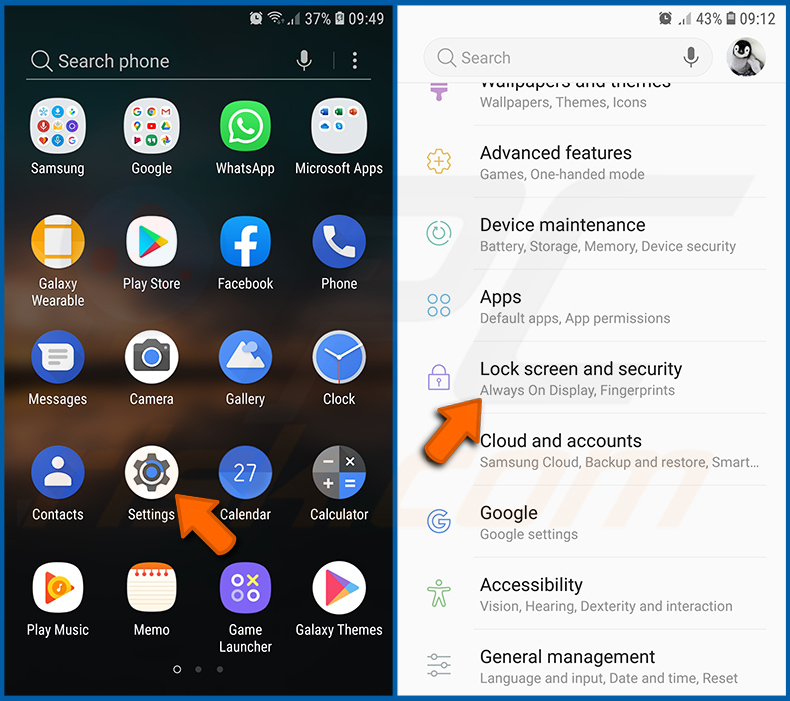
Gehen Sie zu „Einstellungen", scrollen Sie nach unten, bis Sie „Sperrbildschirm und Sicherheit" sehen, und tippen Sie darauf.
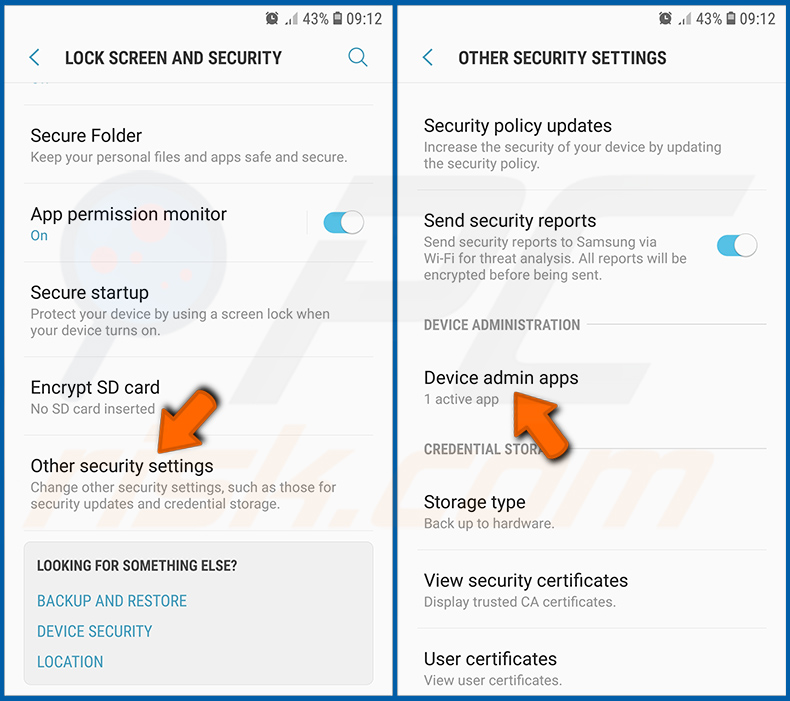
Scrollen Sie nach unten, bis Sie „Andere Sicherheitseinstellungen" sehen, tippen Sie darauf und dann auf „Geräteadministrator-Apps".
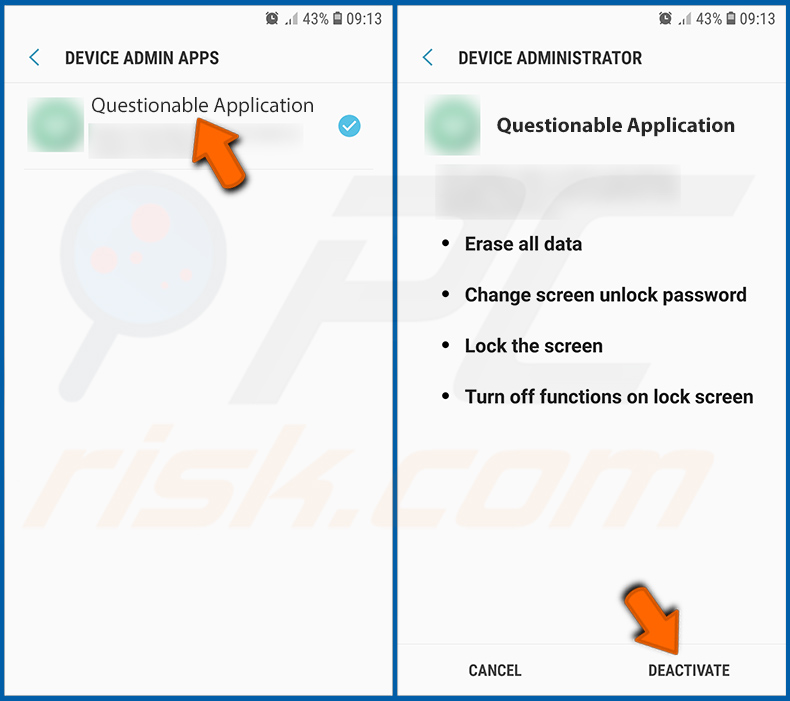
Identifizieren Sie Anwendungen, die keine Administratorrechte haben sollten, tippen Sie darauf und dann auf „DEAKTIVIEREN".
Häufig gestellte Fragen (FAQ)
Mein Android-Gerät ist mit der Mantax Otax Malware infiziert. Sollte ich meinen Speicher formatieren, um sie loszuwerden?
Zum Entfernen von Mantax Otax ist eine Formatierung in der Regel nicht erforderlich. Das Ausführen eines seriösen mobilen Antivirenprogramms wie Combo Cleaner sollte ausreichen, um sie zu erkennen und zu beseitigen. Bedenken Sie, dass das Entfernen der Malware (oder das Formatieren des Geräts) bereits gesperrte Dateien nicht entschlüsselt, stellen Sie diese also aus einem Backup wieder her, falls Sie eines haben.
Was sind die größten Probleme, die die Mantax Otax Malware verursachen kann?
Mantax Otax kann Fotos und Dokumente verschlüsseln, das Telefon hinter gefälschten Sperrbildschirmen sperren und die echte Sperrbildschirm-PIN stehlen. Sie zeichnet außerdem den Bildschirm auf, macht heimliche Fotos und sammelt SMS-Nachrichten (einschließlich Einmalpasswörter), Kontakte, Anrufprotokolle, Browserverlauf sowie WhatsApp- und Telegram-Chats.
Infolgedessen sind die Opfer mit Datenverlust, ernsthaften Datenschutzproblemen, finanziellen Verlusten und Identitätsdiebstahl konfrontiert.
Was ist der Zweck der Mantax Otax Malware?
Die meisten Malware-Angriffe sind gewinnorientiert, und Mantax Otax ist keine Ausnahme - sie setzt die Opfer unter Druck, für die Rückgabe ihrer Dateien zu zahlen, während sie Daten sammelt, die missbraucht oder verkauft werden können. Malware kann jedoch auch zur Unterhaltung, aus persönlichen Rachegelüsten, zur Störung, für Hacktivismus oder aus politischen Gründen eingesetzt werden, und die Belästigungsfunktionen in der zweiten Version lassen darauf schließen, dass einige Betreiber es einfach genießen, Opfer zu quälen.
Wie hat die Mantax Otax Malware mein Android-Gerät infiltriert?
Mantax Otax wurde als APK-Dateien auf Drittanbieter-Filesharing-Diensten verbreitet, wobei Links über Messaging-Apps, Phishing-Nachrichten und andere Social-Engineering-Methoden verbreitet wurden. Die bisher beobachteten Samples gaben sich als indonesische App mit Erwachseneninhalten oder als legitime Apps wie Grok aus. Sie wird nicht über den Google Play Store verbreitet, sodass die Opfer sie manuell installieren müssen.
Wird Combo Cleaner mich vor Malware schützen?
Combo Cleaner ist in der Lage, nahezu alle bekannten Malware-Infektionen zu erkennen und zu beseitigen, einschließlich Bedrohungen wie Mantax Otax. Das Durchführen eines vollständigen Systemscans ist unerlässlich, da sich ausgeklügelte bösartige Programme in der Regel tief im System verbergen.
Teilen:
 Facebook
 X.com
X.com
 LinkedIn
 Link kopieren

Tomas Meskauskas
Erfahrener Sicherheitsforscher, professioneller Malware-Analyst
Meine Leidenschaft gilt der Computersicherheit und -technologie. Ich habe mehr als 10 Jahre Erfahrung in verschiedenen Unternehmen im Zusammenhang mit der Lösung computertechnischer Probleme und der Internetsicherheit. Seit 2010 arbeite ich als Autor und Redakteur für PCrisk. Folgen Sie mir auf Twitter und LinkedIn, um über die neuesten Bedrohungen der Online-Sicherheit informiert zu bleiben.
Das Sicherheitsportal PCrisk wird von der Firma RCS LT bereitgestellt.
Gemeinsam klären Sicherheitsforscher Computerbenutzer über die neuesten Online-Sicherheitsbedrohungen auf. Weitere Informationen über das Unternehmen RCS LT.
Unsere Anleitungen zur Entfernung von Malware sind kostenlos. Wenn Sie uns jedoch unterstützen möchten, können Sie uns eine Spende schicken.
SpendenDas Sicherheitsportal PCrisk wird von der Firma RCS LT bereitgestellt.
Gemeinsam klären Sicherheitsforscher Computerbenutzer über die neuesten Online-Sicherheitsbedrohungen auf. Weitere Informationen über das Unternehmen RCS LT.
Unsere Anleitungen zur Entfernung von Malware sind kostenlos. Wenn Sie uns jedoch unterstützen möchten, können Sie uns eine Spende schicken.
Spenden
▼ Diskussion einblenden